Exult: A Display Font That Commands Attention
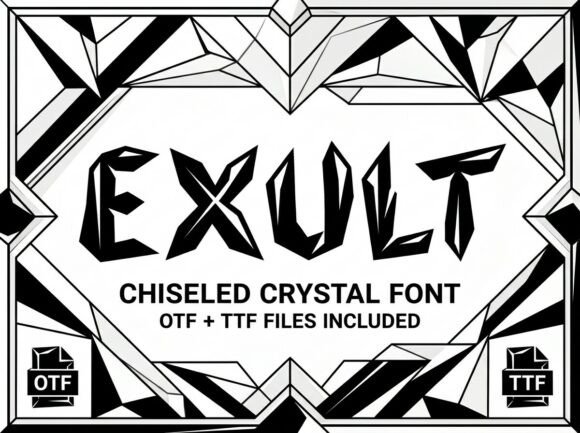
Every so often, a typeface comes along that doesn’t just sit quietly on the page—it demands to be noticed. Exult is that kind of premium font. It’s a decorative display font built for moments when ordinary letters won’t cut it. Think of it as the typographic equivalent of a spotlight: bold, artistic, and unapologetically present. If you’re working on a project that needs to make a strong first impression, Exult is designed to be your secret weapon.
The Personality Behind the Glyphs
What makes Exult stand out? It’s all in the details. Each letterform is crafted with unique artistic elements—subtle curves, unexpected angles, and a strong visual weight that gives it a distinct personality. This isn’t a sans serif font or a script font meant for body text. Exult is a display typeface, meaning it’s engineered for high-impact scenarios where you want every character to feel like a piece of art. The overall style leans modern with a touch of decorative flair, striking a balance between contemporary aesthetics and timeless appeal.
Because it’s an all-caps typeface, Exult carries an inherent sense of authority and formality. Uppercase letters naturally command more visual space, which amplifies its bold, attention-grabbing quality. It’s the kind of creative font that works beautifully when you need to establish a strong hierarchy or inject energy into a design without relying on complex illustrations or layouts.
Where Exult Truly Shines
Knowing where a font excels is just as important as understanding how it looks. Exult isn’t meant for long paragraphs of text—it’s designed for moments that matter. Here are some practical applications where this display font can elevate your work:
- Logo Design & Brand Identity: A logo sets the tone for your entire brand. Exult’s distinctive character makes it ideal for creating memorable wordmarks or monograms. It helps brands appear confident, innovative, and design-forward. Pair it with a simpler serif font or sans serif font for body copy to maintain balance.
- Editorial & Packaging Design: On magazine covers, book titles, or product packaging, Exult can serve as a powerful headline font. Its artistic flair draws the eye immediately, which is crucial in crowded retail environments or competitive newsstands.
- Web Design & Digital Presence: Use Exult for hero sections, website headers, or call-to-action buttons where you need to guide the user’s focus. In web design, a striking display font can reduce bounce rates by making a page feel more engaging from the first second.
- Social Media Graphics: In the fast-scrolling world of social platforms, grabbing attention is half the battle. Exult’s bold presence makes it perfect for Instagram posts, Pinterest pins, or YouTube thumbnails where text needs to be legible even at small sizes.
- Event & Marketing Collateral: From posters and flyers to invitations and business cards, Exult adds a layer of sophistication and creativity. It’s particularly effective for campaigns that want to feel modern and culturally relevant.
Making Exult Work For Your Project
Choosing the right font is a strategic decision, not just an aesthetic one. Before integrating Exult into your workflow, consider a few key factors to ensure it aligns with your goals:
Evaluate Your Project’s Needs
Ask yourself: Does this project require a font that stands out, or one that blends in? Exult is a display font, so it’s best suited for applications where text is short and impactful. If you’re designing a novel or a technical manual, this probably isn’t your primary typeface. But for a brand launch, a promotional poster, or a social media campaign, it could be exactly what you need.
Test Font Pairings Thoughtfully
One of the most valuable skills in modern typography is pairing fonts effectively. Because Exult is so expressive, it often works best alongside more neutral typefaces. Try combining it with a clean sans serif font like Helvetica or a classic serif font like Garamond for body text. The contrast will let Exult’s personality shine without overwhelming the reader. Remember, good font pairing creates harmony, not competition.
Understand the File Formats
Exult comes with both OTF and TTF files. The OTF (OpenType Font) format is ideal for professional design software like Adobe Illustrator or InDesign, offering advanced typographic features. The TTF (TrueType Font) ensures compatibility across virtually all devices and applications, from Microsoft Word to Canva. Having both formats means you can use Exult seamlessly whether you’re a professional designer or a small business owner creating materials in everyday tools.
Consider Readability & Context
While Exult is designed to be legible at display sizes, always test it in context. Check how it renders on different screens, in print proofs, or at various scales. Because it’s an all-caps typeface, letter spacing (tracking) can significantly impact readability. Adjust spacing as needed to ensure words remain clear, especially in logos or headlines where every letter counts.
Licensing and Practical Considerations
Before purchasing any commercial font, it’s crucial to understand the licensing terms. Exult is licensed for both personal and commercial use, but always review the specific license agreement to ensure it covers your intended applications—whether that’s for client work, merchandise, or digital products. Investing in a premium font like Exult not only gives you access to high-quality design assets but also supports the creators behind the work.
In a world saturated with generic typography, choosing a distinctive typeface like Exult can set your projects apart. It’s not just about following trends—it’s about making intentional design choices that resonate with your audience and reinforce your message. Whether you’re crafting a brand identity, designing marketing materials, or building a digital presence, Exult offers a powerful way to communicate with style and confidence.